
How To Use A Computer For Chess Analysis
Chess analysis is the most important part of any chess training plan, and in today’s world, computer chess analysis is an essential tool for improving your game.
By helping you to find the best moves, chess computers can help to train your brain to recognize your weaknesses, spot tactical opportunities, and habituate solid play. In this article, you’ll learn how to get started in computer chess analysis and how to do it right.

What is Computer Chess Analysis?
Since the 1980s, chess computers have helped chess players analyze their games. By evaluating each position and the best next moves, chess computers (usually powered by ‘chess engines’) help players review their games and gain key insights to make them better chess players.
In today’s online chess era, most players use some form of computer analysis. Whether it’s deep, thorough analysis of using ChessBase or the ‘game review’ feature on chess.com, chess computers are helping millions of players spot their mistakes and discover the tactics and strategies that will elevate their game.
How Computer Chess Analysis Works
Chess.com Game Review Tool
Chess.com is the world’s most popular online chess platform, and the review tool offers a beginner-friendly yet useful way to analyze games. It begins with a screen that tells you major stats like move accuracy percentage and a (very approximate) game rating.

The Collector Series Luxury Chess Pieces - 4.0" King

The Camaratta Signature Master Chess Table

LIMITED EDITION - DGT 3000 Digital Chess Clock
Next, an AI ‘coach’ walks you through each move, telling you whether accurate moves were good, excellent, great, or brilliant. Alternatively, poor moves are categorized as blunders, mistakes, misses, or inaccuracies.
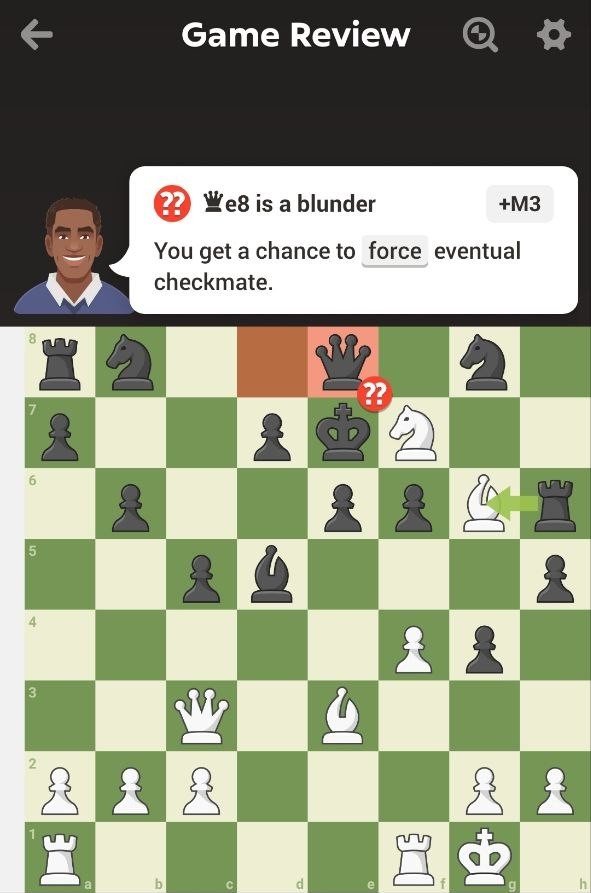
The coach’s explanations of why each move warrants its evaluation can be useful, though occasionally misleading. Nevertheless, the review tool is fun, fast, and a useful way to get a quick overview of your game.
You can enjoy one free game review per day with a standard account on Chess.com. For unlimited reviews, you’ll need to purchase a Platinum or Diamond membership plan. Alternatively, you can learn how to analyze your own games for free.
Using a Chess Computer Analysis Board
For a more serious review, use a standard computer analysis board. Major platforms like chess.com and lichess.org allow you to review as many games as you want like this, for free.
Here are the key components you’ll need to understand:
The Evaluation Bar
When using a computer analysis board, the most important feature to understand is the evaluation bar (usually on the left side). This offers an objective evaluation of the position, assuming that both players find the best moves.
Chess engines measure evaluation is in ‘centipawn’ points - one centipawn is 1/100th of the value of one pawn. An advantage to White is indicated with a plus sign (e.g., +2.75), and an advantage to Black is indicated with a minus sign (e.g., -0.82).

The Harrwitz Series Timeless Chess Pieces- 3.5" King

Super Deluxe Tournament Director Kit

Large Wedge Chess Clock Carrying Bag
In the position below, the chess.com evaluation bar shows +4.5. This indicates that White has an advantage of +4.5 points if the best moves are played.
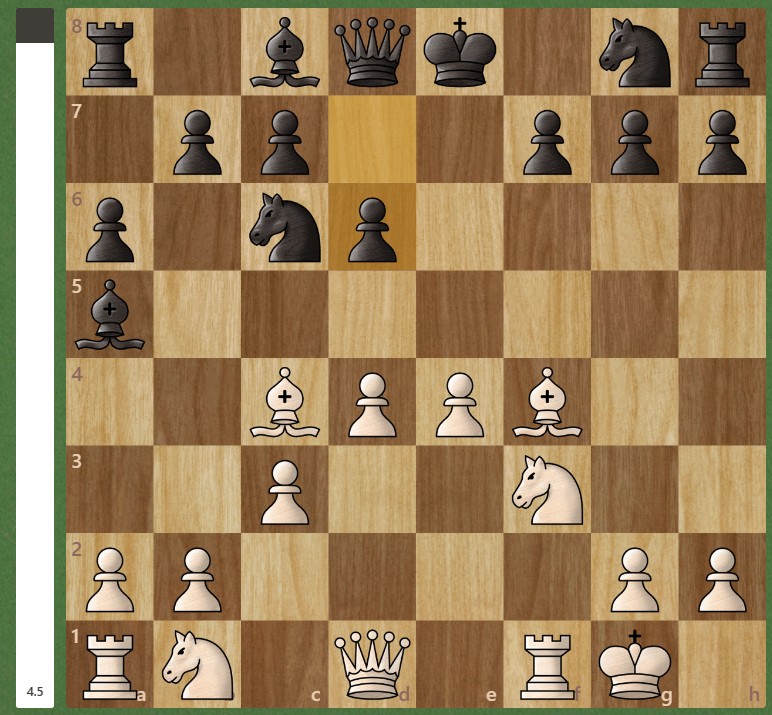
+4.5 points may seem surprisingly pronounced in this position, so what are the best moves that White now needs to find to realize its advantage? Let’s take a look at the 'Engine Lines' pane to find out.
The Engine Lines Window
To find out the best next move and the best sequence (line) of moves ahead, we refer to the ‘Engine Lines’ window. On Chess.com, as on most platforms, you’ll find this in the top right-hand corner. Of course, for this you'll need to be conversant in chess notation.
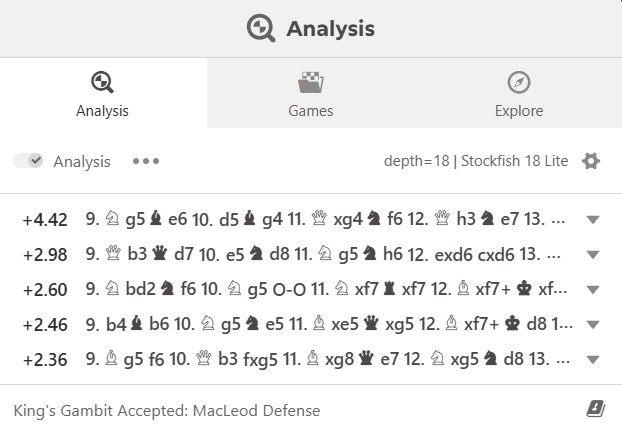
In this example, the engine shows us that the move that gives White a +4.4 evaluation is the aggressive 9. Ng5. Notice how other moves like 9. Qb3 and 9. Nbd2 offer significantly lower evaluations. White must find the right move to capitalize on its advantage and avoid a significant centipawn loss.
Opening Explorers
In addition to chess engine tools, opening explorers are often more useful for evaluating the likely success of various moves against human opponents.
Opening explorers are vast databases of opening sequences played in real games that tell us the average outcome (win-rate) statistics of any given move in an opening. Free opening explorers featured on platforms like lichess.org and chess.com allow access to both millions of online amateur games and master games.

The Burnt Dubrovnik Series Chess Pieces - 3.75" King

DGT 2500 Digital Chess Clock

Premium Chess Box - Brazilian Rosewood
The image below shows the lichess.org Opening Explorer tool in the bottom right-hand corner, examining the Italian Game. We see a list of Black’s next moves ranked by popularity. We can see that Black’s most popular moves, like 3...Bc5 and 3...Nf6 only scores an average win-rate of 46 or 47%. Looking further down the table, however, do you notice an anomaly?
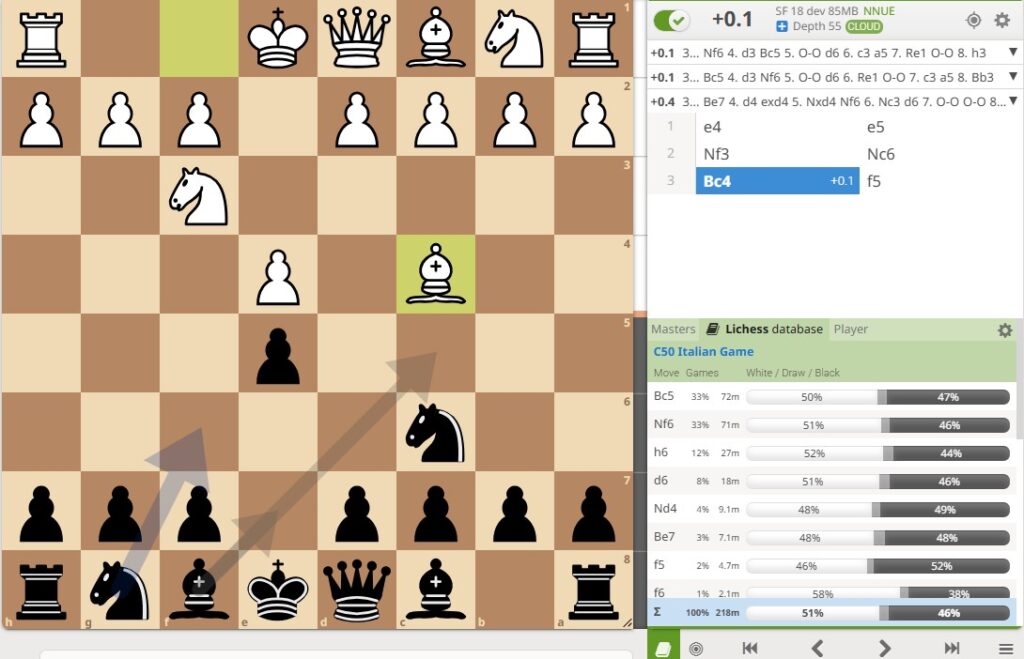
Did you spot it? Despite being played in only 2% of games, 3...f5 scores Black a whopping 52% win rate, the highest-scoring of any response.
This rare sideline, named the ‘Rousseau Gambit’, is the perfect example of where studying Opening Explorers makes sense. While not considered objectively sound by chess engines, 3...f5 scores brilliantly for Black in real games against human opponents, and so it may be deemed worth studying and playing next time.
Chess.com or Lichess?
Chess.com and lichess.org are the two top online chess platforms in the world, and both offer useful post-game analysis features.
For traditional computer chess analysis, both platforms offer similar free features. If you want to regularly use the review tool with the AI chess coach, however, then you’ll need to choose chess.com.
For opening explorers, many people find the lichess.org interface more intuitive to use. It also features some useful commentary on the opening you’re studying in the pane on the left-hand side. Chess.com does boast a bigger data pool to draw from, however, both for master and online games.
How to Analyze Games Like a Grandmaster
While many amateur chess players simply head straight for computer analysis immediately after a game, grandmasters do it rather differently. Here are some top chess learning tips from the pros.

The Library Collection - The Anderssen Dropjaw Series Luxury Chess Pieces - 3'' King

DOWNLOAD - FRITZ 21

Millennium eONE Electronic Chess Board for playing on chess.com
First, Analyze for Yourself
The method that every serious player uses for game analysis is to first perform self-analysis without computer assistance. This more involved method means reviewing the game you just played, move by move, and adding your own commentary.
What were the key decision-making moments of the game? What were the other candidate moves that you'd like to explore now? Did you find any effective strategies that you’d like to repeat next time? Do you notice any recurring themes in your games? Write down all of these alongside the game notation as soon as possible after the game is finished, while the moves and your decisions are still fresh in your mind.

Secondly, Verify With a Computer
Only once the self-evaluation is complete do strong club players and master chess players consult computer analysis. This method allows you to see how accurate your analysis is and further highlights any gaps in your game.
Another nuance is how master players interpret the computer's recommendations. Where the computer recommends lines that they haven’t spotted, instead of just scribbling down ‘the correct line,' masters always ask themselves: Why? By asking this vital question, you’ll be far more engaged and improve your understanding, not just by correcting your mistakes. Remember to use computer analysis as a training partner, not an answer sheet.
Common Mistakes in Chess Computer Analysis
Probably the most common mistake beginners make when using computer analysis tools is giving too much weight to the line the computer chooses and always assuming the computer knows best. It’s very important to remember, however, that humans don’t play like machines.
Humans are fallible, and even grandmasters make mistakes all the time. Chess computers, on the other hand, evaluate each move assuming that your opponent will always find the best move, a wholly unrealistic expectation at any level!
Human chess coaches will sometimes remind their students that chess computers tend to under-evaluate attacking positions and over-evaluate defensive ones. Remember, when you make a mistake when attacking, the consequences are minor. When you make a mistake when defending, the consequences are often dire.
An Art of a Science? Chess as Self-Expression
Another question worth considering when training with chess computers is, "What is your goal in chess?" Is it simply to always find the best objective move and win as many games as possible—or are there other values you’d like to uphold?

The Bohemian Series Chess Pieces - 4.0" King - Lacquered

DOWNLOAD - CHESSBASE '26 - Premium Package

The Millennium King Competition Chess Computer
Eighth World Champion Mikhail Tal once said, "For me, chess is more an art than a science,” and firmly believed that “self-expression” was far more important than clinical accuracy. Many great chess players before and since have echoed the same sentiment.
If you also enjoy the thrill of imaginative, tactical play and daring sacrifices, don’t let a chess computer tell you otherwise! A chess computer is a useful tool, but never let it become your master. Only you know which was the best move for you according to your objectives and style of play.
Conclusion
Chess computers are an invaluable tool for chess analysis, but they need to be used correctly. When used in a mindful, measured way in combination with self-analysis, chess computers can play a very valuable role in helping you recognize weaknesses and habituate ever-stronger play.
- Related: To make the experience of online games and chess analysis more tactile, have you ever considered investing in an electric chessboard?